
Studio
A delegation three levels deep is, in a terminal, a scrollback you have already lost. Crewforth Studio is a local panel that draws it instead: one node per agent on a canvas, appearing as they spawn, each carrying what it is doing right now, which tool it last reached for, what it has spent and what it reported back.
It reads ~/.claude/projects — where Claude Code keeps every session on this machine — so one running panel sees all of them at once, whether or not a project has Crewforth installed, and without being started inside any of them.
/crew-studio # in any project that has Crewforthnode .claude/studio/server/index.js --open # the same, without the command menunpx crewforth studio # without installing anything# `node` not on PATH? Crewforth keeps its promise not to edit it — ask for the one it fetched:# NODE="$(bash .claude/studio/ensure-node.sh)" && "$NODE" .claude/studio/server/index.js --open| In the panel | What it rests on |
|---|---|
| The delegation graph of any session, live | the transcript tree on disk, re-read on a size signature every 700 ms |
| Sessions the panel starts, driven from a chat pane | claude -p in stream-json, over the child’s stdin and stdout |
| Every tool call in one of those parked until you answer | a PreToolUse hook injected through the panel’s own settings file, matching *. It answers at 45 s against the harness’s 90 s, and silence is a denial — a panel that is closed does not become permission |
| Continuing a session rather than copying it | a bare --resume when no process holds that session, which keeps its id and appends to its transcript; a fork when one does, because two writers on one transcript corrupt it |
| The gate log, session stats and board | Crewforth’s existing scripts, read rather than recomputed — and gate-log entries are labelled as carrying no timestamp, because that format has none |
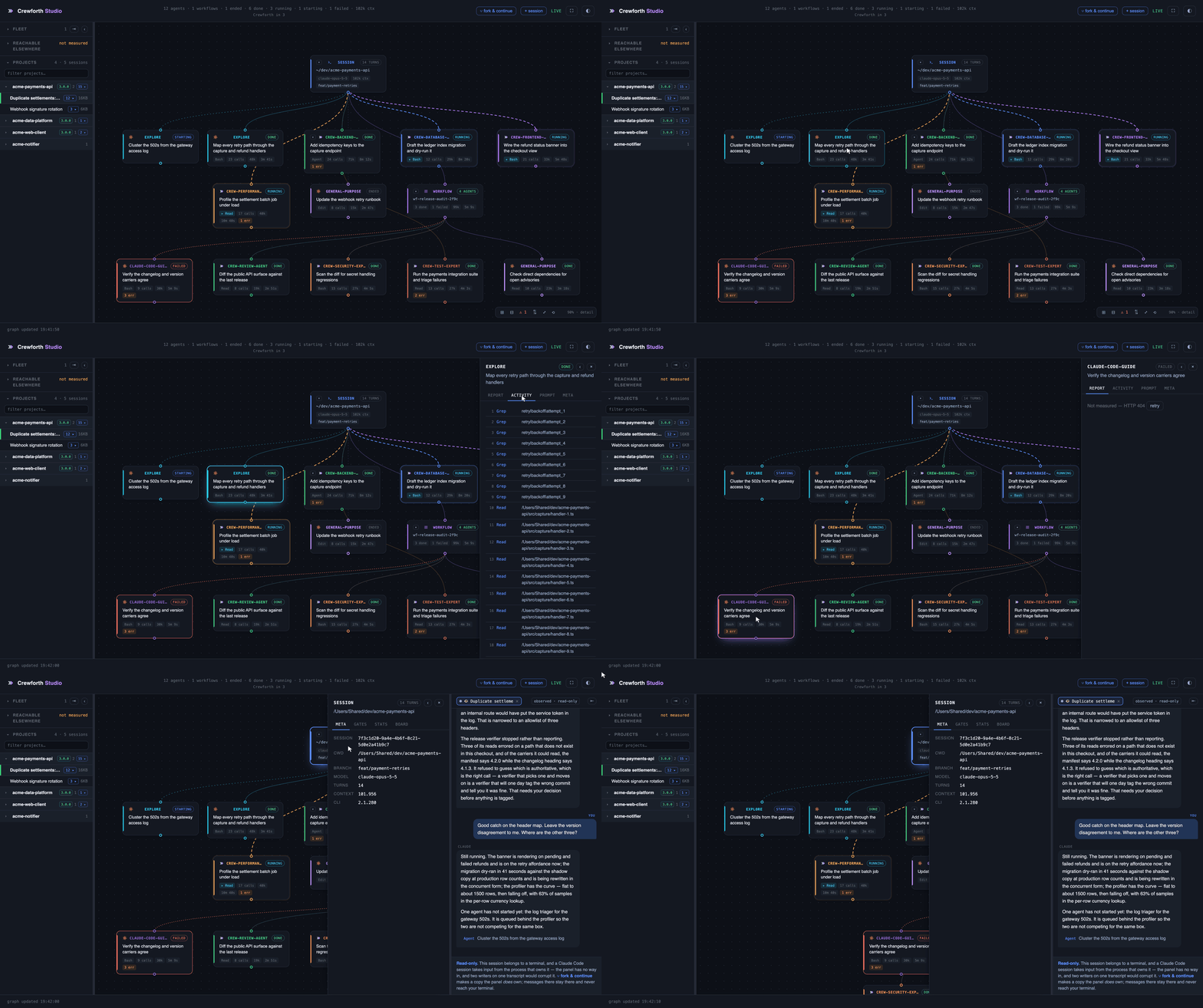
The same panel, driven: open a session, read what an agent reported, jump to the one that failed, read the conversation behind it.
Studio installs with Crewforth. start.sh and adopt.sh create six directories under .claude/ and Studio is the sixth, so in any project that has Crewforth you open it with /crew-studio — or, without the command menu, node .claude/studio/server/index.js --open. It has zero npm dependencies, wants Node 18+, binds to 127.0.0.1 only and requires a per-run token on every API path. No Node on the machine? Crewforth goes and gets one. .claude/studio/ensure-node.sh --plan shows exactly what it would fetch — the current LTS from nodejs.org, checked against the published SHA-256 and unpacked into ~/.claude/studio-runtime — and installs nothing until you say yes. No admin rights, no package manager, no PATH edit; deleting that one directory undoes it.
| Channel | Studio |
|---|---|
npx crewforth · release tarball · git clone |
installed to .claude/studio/ |
| Claude Code plugin | shipped inside the plugin, opened with /crewforth:crew-studio (plugin commands are namespaced) |
All four channels carry it. One command file serves both editions: Claude Code substitutes the plugin’s own install path into it, so the panel is found wherever it actually is. The panel behaves identically in both, with one honest gap — its telemetry tabs read the project you opened it from, and a plugin install puts no Crewforth files into a project, so the gates, stats and board tabs report “not measured” with the reason rather than a misleading zero. The gates tab still lists the gate decisions the plugin’s guards logged to that project’s .claude/gate-log.tsv.
It reads ~/.claude/projects, which holds every Claude Code session on the machine. Starting it from a project root only decides which project it opens on.
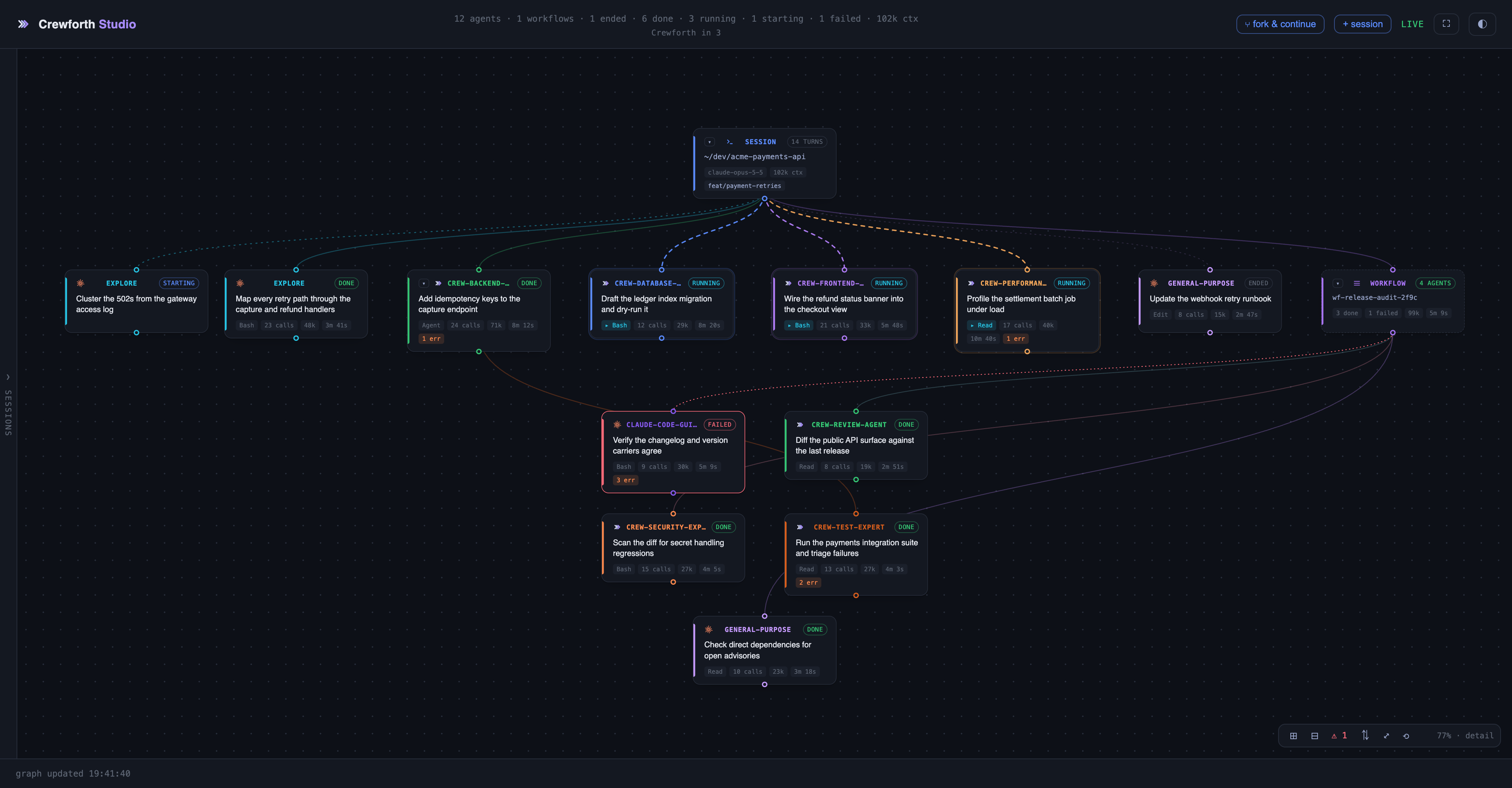
What each agent is doing, what it has spent, and the one that failed — reachable by the ⚠ button without hunting for it.